
Design System Roadmap
Find the gaps AI will expose in your Design System before they scale
Get a clear view of missing context, weak connections, and priority fixes before AI turns them into repeated output
Trusted by designers from
Giving AI access to Figma, code, or documentation does not explain how the system should work. AI needs clear decisions, rules, relationships, and constraints
of designers and developers say they fully trust the output generated by AI tools
Source: Figma AI Report
of design system teams say AI is strongly delivering on its expected potential today
Source: zeroheight Design Systems Report
AI workflows now depend on system clarity before they scale
When AI starts working across design, code, and team workflows, missing system context becomes a scaling problem
What changed in Figma / Config 2026
Code Layers
Code can now live and change closer to the design canvas
Agent Skills
Repeated work can become reusable instructions for AI agents

Code moves closer to design
Code Layers make unclear naming, tokens, states, and component logic harder to control

Agents reuse system decisions
Agent Skills turn missing rules into reusable assumptions across repeated work

Context becomes the workflow
AI needs clear rules, limits, mapping, and docs it can apply reliably
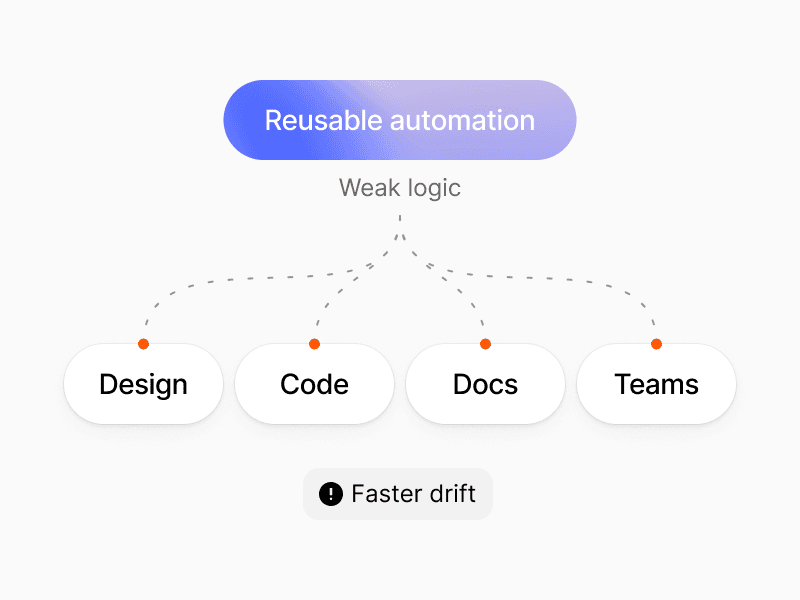
Automation scales weak spots
Reusable automation spreads unclear system logic across products and teams
The Roadmap helps identify which system decisions must become clear before AI starts applying them at scale
AI reveals the gaps your team has learned to work around
When system decisions are unclear or scattered, people use experience while AI fills the gaps with assumptions
Priorities are unclear
Teams cannot decide what to improve before introducing AI into their workflows
Important gaps stay hidden
Missing rules, constraints, and dependencies remain invisible until AI exposes them
Decisions are scattered
AI receives conflicting context from Figma, code, documentation, and team knowledge
AI starts guessing
Without clear system logic, AI invents decisions and scales inconsistency
Turn system uncertainty into clear next priorities
Use the Roadmap to understand your system, focus your effort, and prepare its decisions for AI-assisted work


1
Assess
Review 20 system areas to find missing, unclear, or disconnected decisions
2
Prioritize
Compare gaps, dependencies, and goals to choose the most valuable priorities
3
Prepare for AI
Identify where missing context and constraints force AI to guess
Use the Roadmap when your system needs a clearer direction
Apply one complete model across different stages, challenges, and points of change
AI output does not match the system
When AI or MCP tools produce output that looks plausible but ignores system semantics, rules, or constraints, the Roadmap helps identify which decisions are too unclear for AI to apply reliably.
Outcome
A clear list of system decisions that must become explicit before AI can apply them reliably and consistently
Redesign or system cleanup
Starting a design system from scratch
System work has stalled
Getting team support
See the full scope of an AI-ready design system
Explore 20 connected areas across four stages to understand what exists, what is missing, and what needs attention next

Define
Set the goals, principles, scope, architecture, and ownership that guide the system

Create
Turn decisions into foundations, tokens, components, aligned code, and documentation

Adopt
Help teams release, understand, use, contribute to, and govern the system

Evolve
Use metrics and feedback to prioritize, maintain, and improve the system over time
Most teams overlook at least one area they never considered part of the system
Give AI the context it needs at every step of your system
Each of the 20 steps helps assess the current state, check readiness, and reveal where AI needs clearer context
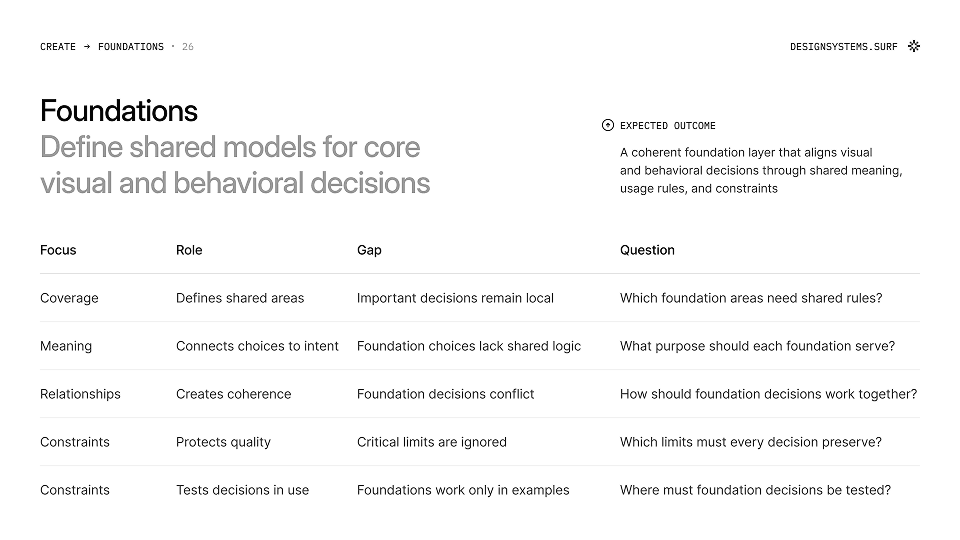
Overview
Understand the role, outcome, common gaps, and key questions for each area

Checkpoints
Check whether each area is clear enough to support the system
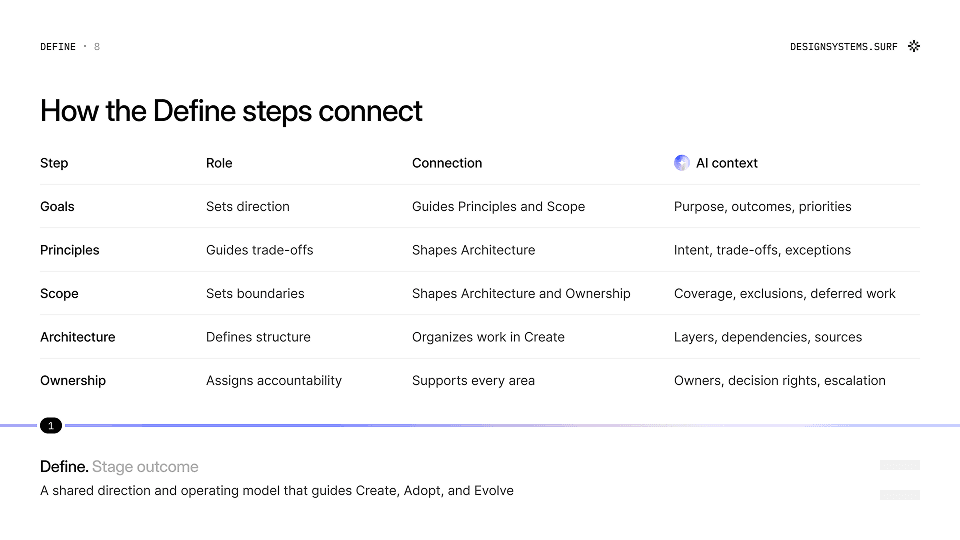
AI Context
See what AI must know and where missing context may force it to guess

AI Readiness
Test whether AI can apply system decisions without inventing missing logic
Reviewing the resource has already given me several ideas on how to improve and document my current design system to its full potential and I’m especially excited to explore the AI powered tools next
Altamash Khan
UX/UI Designer
Built for the people moving design systems forward
Use one shared model to assess the system, align decisions, and plan what comes next
01
Product designers
Plan or improve a system while balancing product work and limited resources
02
UX/UI Designers
Bring scattered interface decisions into a clearer system structure and shared plan
03
Design System Designers
Review the full system, uncover gaps, and set priorities across connected areas
04
Design Leads
Align teams and stakeholders around scope, dependencies, and next steps


























































































Based on analysis of 100+ design systems. Patterns translated into a practical AI-ready roadmap
Since 2023, Design Systems Surf has cataloged mature design systems across foundations, components, documentation, implementation, adoption, and governance.
The AI-Ready Design System Roadmap turns that research into a practical model for assessing system gaps, setting priorities, and making decisions clearer for teams and AI.
Trusted by designers working on design systems
Feedback from people building, auditing, documenting, and maintaining design systems
10k+
Designers across 175+ countries follow Design Systems Surf for design system examples, patterns, and practical resources
What to know before you start
Clear answers about what Typography Foundation includes, how it can be customized, and how it fits into real design system work
What is an AI-ready design system?
An AI-ready design system makes its decisions, semantics, rules, relationships, and constraints explicit enough for AI tools to apply them without inventing missing logic.
How do you make a design system AI-ready?
Start by finding where system knowledge is unclear, undocumented, or disconnected across design, code, and documentation. Then make the relevant rules, constraints, ownership, and sources of truth explicit.
What should a design system roadmap include?
A design system roadmap should cover direction, foundations, tokens, components, documentation, design-code alignment, adoption, governance, measurement, maintenance, and prioritization.
How can I audit my design system for AI readiness?
Review each system area to identify what AI must know, where context is missing, and whether AI can apply existing decisions without guessing.
Is it for new or existing design systems?
Both. Use it to plan a new system, move unfinished work forward, or identify gaps in an existing system.
Do I need to follow the stages in order?
No. The four stages show the complete system journey, but each area can be reviewed independently based on current goals and needs.
Is this a design system maturity model?
No. The Roadmap does not give a maturity score or push every team toward the same target. It helps identify relevant gaps and priorities in the current context.
Does it create a personalized action plan?
No. It provides the structure, questions, checkpoints, and AI readiness tests needed to assess the system and choose the next priorities.
Do I need to use AI tools?
No. The Roadmap is useful for planning and improving any design system. Its AI sections show what must become clearer before AI-assisted workflows can apply system decisions reliably.
Does an AI-ready design system require MCP?
No. MCP gives AI access to system context, but it does not fix unclear rules, inconsistent naming, missing documentation, or design-code gaps.
Can I use the Roadmap with Figma, Cursor, Claude, or ChatGPT?
Yes. The Roadmap is tool-independent and helps prepare system context for AI-assisted workflows across design and development tools.
Does it include AI prompts or tools?
It includes practical AI readiness tests for all 20 areas, but it is not a prompt library or a directory of AI tools.
Does it explain how to build every part of a design system?
The Roadmap explains what each area needs, what gaps to look for, and what “ready enough” means. It does not provide detailed implementation instructions or ready-made assets.
Still have questions?
Reach out at hey@designsystems.surf
By subscribing you agree to our privacy policy & cookie policy and to receive marketing and account-related emails from Designsystems.surf. You can unsubscribe at any time.